Aseprite Point Tracker Script
A downloadable tool
This script generates json or xml files containing the coordinate values of a pixel on each frame as specified by a color, and sorts them by tags.
It's especially useful if you want to track specific points of your animation into game coordinates.
I made this very specifically to make the process for creating Hair Metadata files for Celeste Skin Mods way less tedious.
I also made this in a blur in one afternoon with no prior experience in Lua so don't expect the cleanest code under the hood.
Install Guide
- Download pointTracker.lua and put it in Aseprite's scripts folder (File > Scripts > Open Scripts Folder).
- Then click "Rescan Scripts Folder" to make it appear in the Scripts menu.
- From there you can run it by clicking on "pointTracker".
Usage
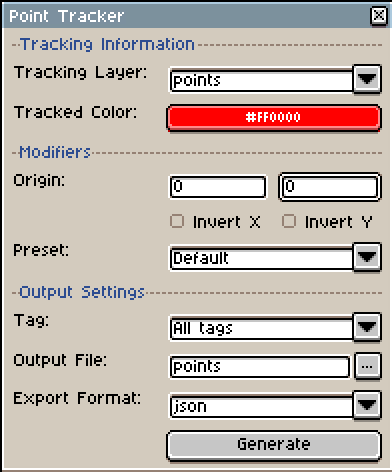
- Tracking Layer - The layer that is being scanned
- Tracked Color - The color value that is being scanned for
- Origin - The origin point the coordinates are relative to (defaults to the top left corner of the sprite)
- Invert X and Invert Y - Don't remember why I added these tbh but they work
- Preset - I made this primarily to help with Celeste Mods but I did want to make it more generally useful so selecting "Celeste" configures the script for Celeste specifically
- Tag - The tag being scanned, if All Tags is selected it iterates through all tags in the order they are on the timeline
- Output File - The file being output to (defaults to the name "points")
- Generate - Generates the file
About the Output
Json files are organized as dictionaries of arrays of dictionaries (I swear this was the least insane way to sort this)
Example:
{
    "idle": [
        {"x": 10,"y": 21},{"x": 10,"y": 21},{"x": 10,"y": 21},{"x": 10,"y": 21}
    ],
    "walk": [
        {"x": 10,"y": 20},{"x": 10,"y": 20},{"x": 10,"y": 19},{"x": 10,"y": 18}
    ]
}
So, if the json file was saved as a variable "example", to access the x position of the first frame in an animation "idle", you would need to get to example["idle"][0].x
Xml files are based directly off the the Celeste formatting
Example:
<Metadata>
    <Frames path="idle" hair="-4,-3|-4,-3|-4,-3|-4,-3|-4,-4|-4,-4|-4,-4|-4,-4|-4,-3"/>
    <Frames path="walk" hair="-4,-4|-4,-4|-4,-5|-4,-6|-4,-6|-4,-5|-4,-4|-4,-4"/>
</Metadata>
Misc
You can ignore specific tags by starting them with "." (you can change this by changing ignoreChar in the code)
Limitations
- It only scans for the first instance of a matching pixel in each frame, you could modify it to record all of them, it just wasn't my goal
- It doesn't support multiple colors, the GUI doesn't support contextual menus and it was out of scope
Here is a link to the source code on Github for anyone curious.
Download

Leave a comment
Log in with itch.io to leave a comment.